
Email Domain Restrictions
Block personal email addresses and require business emails for bookings
Email domain restrictions let you control which email addresses can book meetings. Block personal email domains like Gmail and Yahoo to ensure only business contacts can schedule with you.
 1 / 5
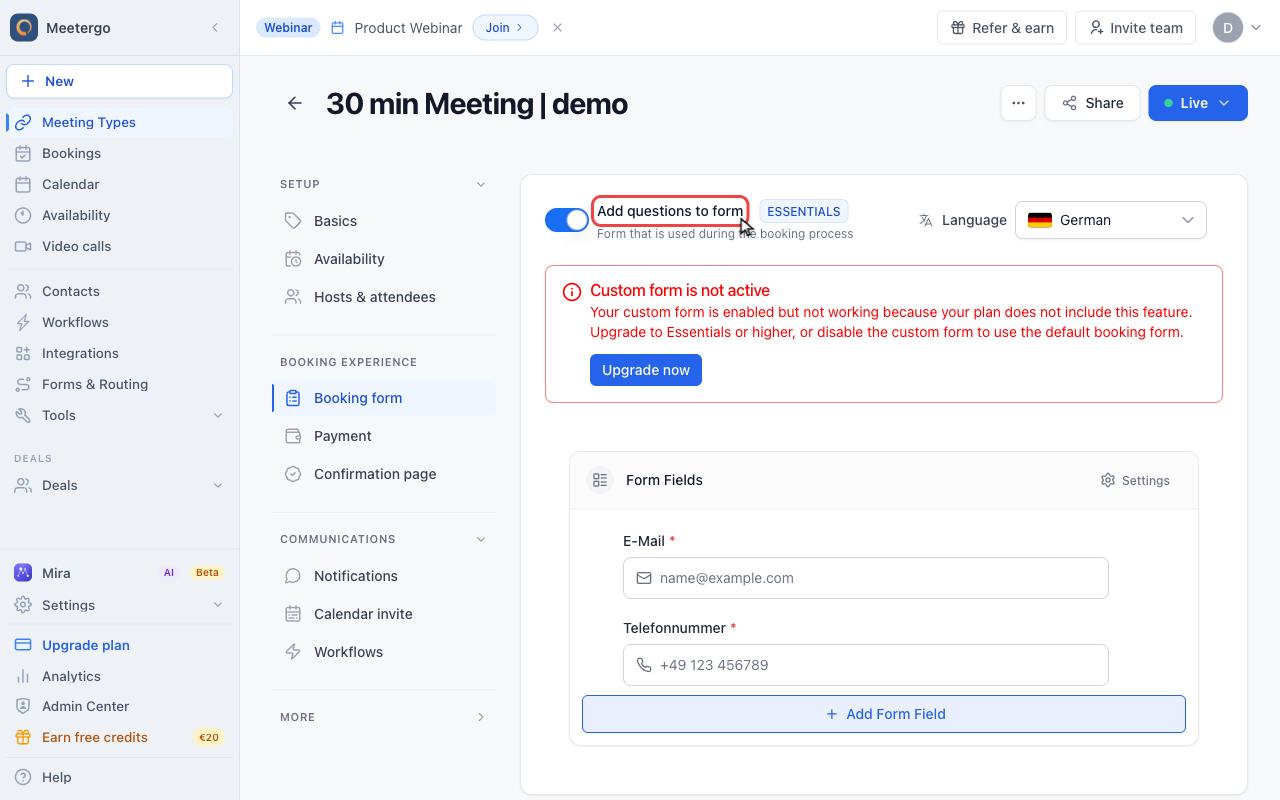
1 / 5Blocked email rules are available when the meeting type uses a custom booking form.
Open Booking form
Confirm the custom form is enabled
Blocked email rules are available when the meeting type uses a custom booking form.
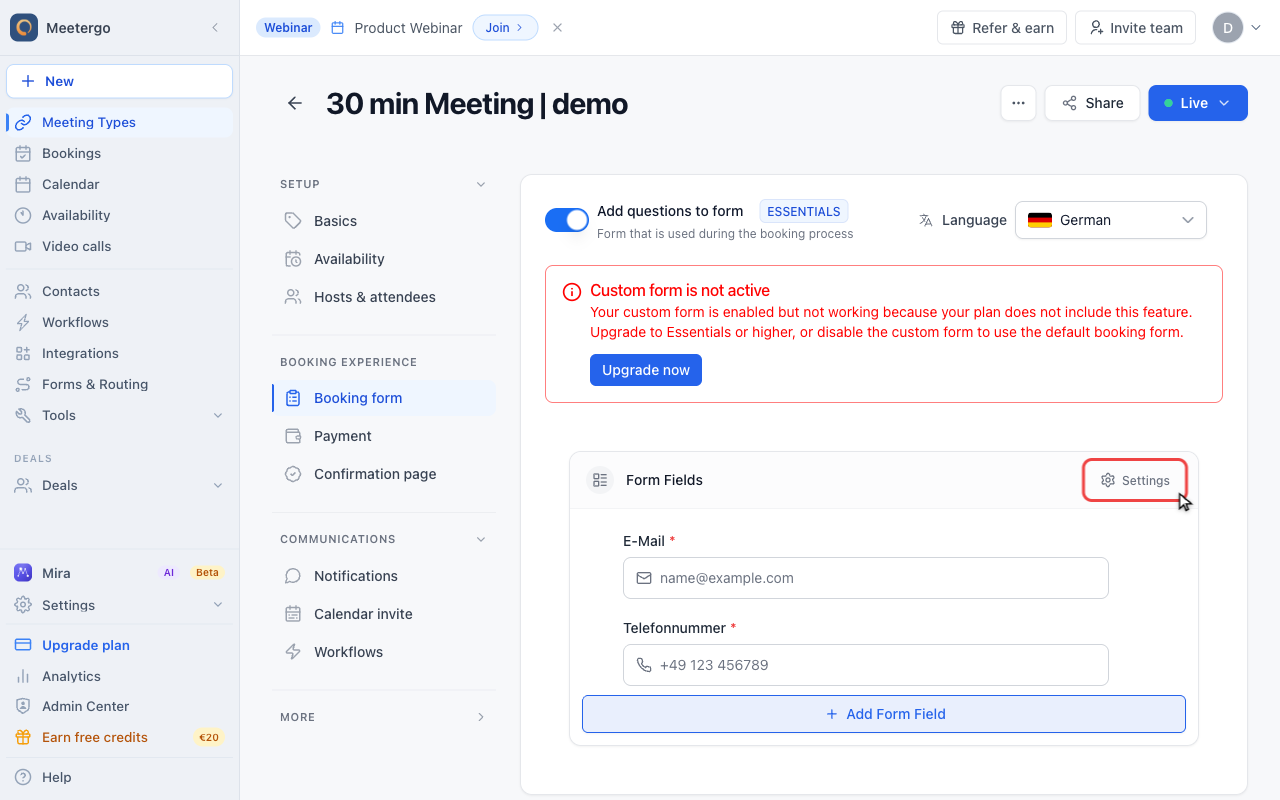
Open form settings
Open Settings
Click Settings in the form editor toolbar to open form-level preferences.
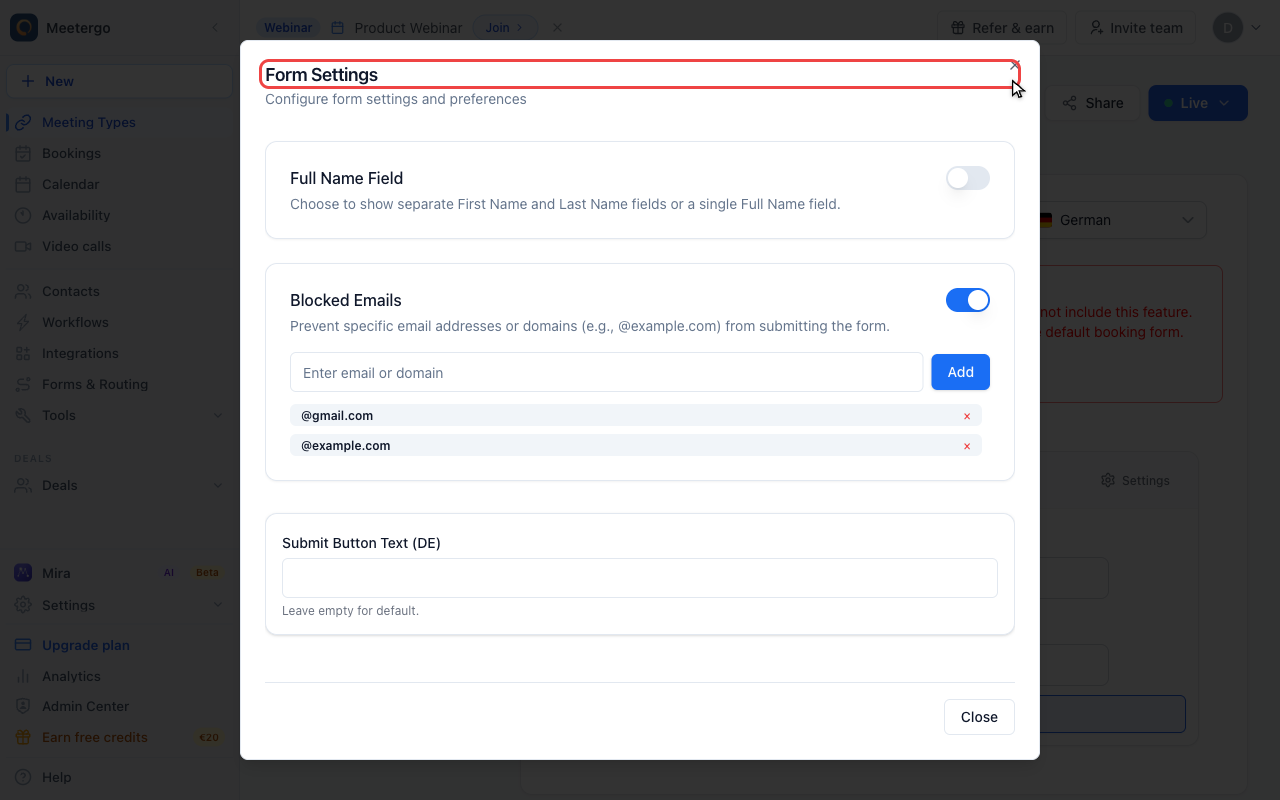
Find Form Settings
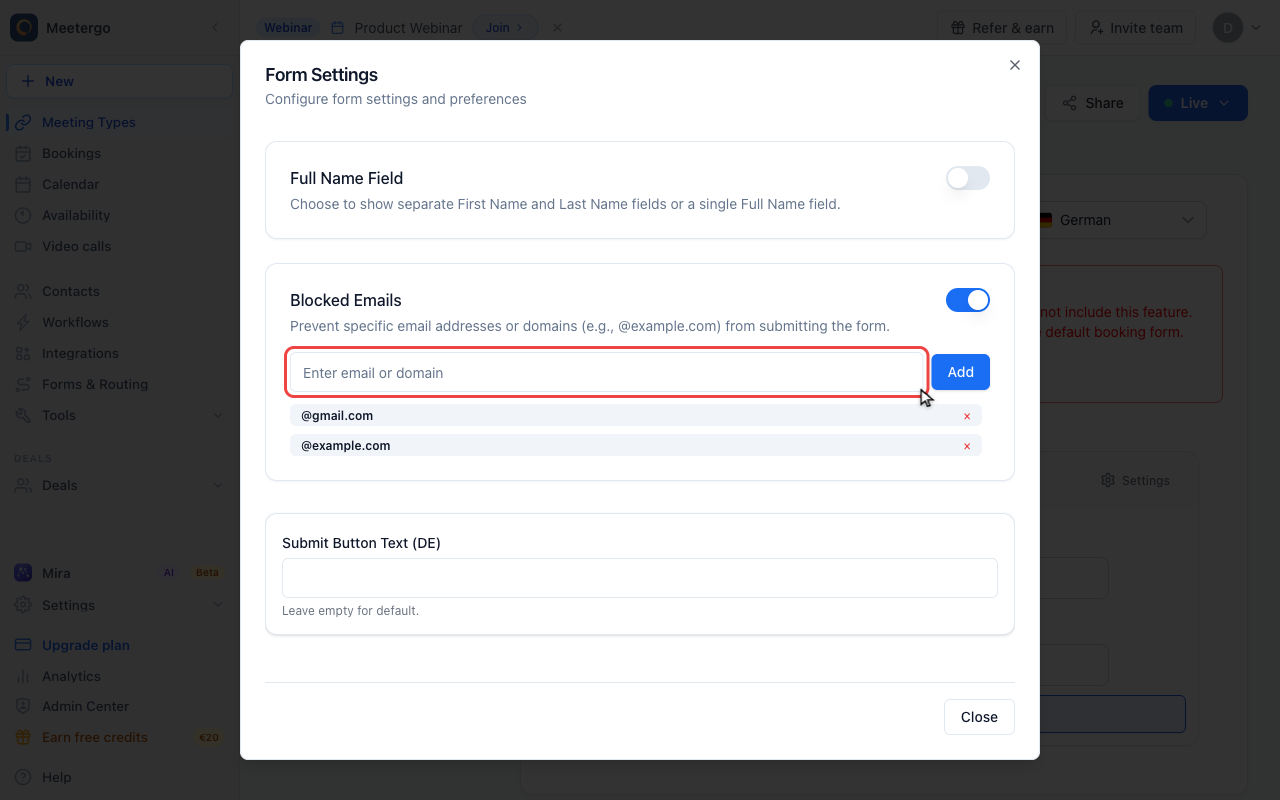
The dialog contains form-level controls such as name fields, blocked emails, and button text.
Configure blocked emails
Enable Blocked Emails
Use Blocked Emails to reject specific email addresses or domains before a booking form can be submitted.
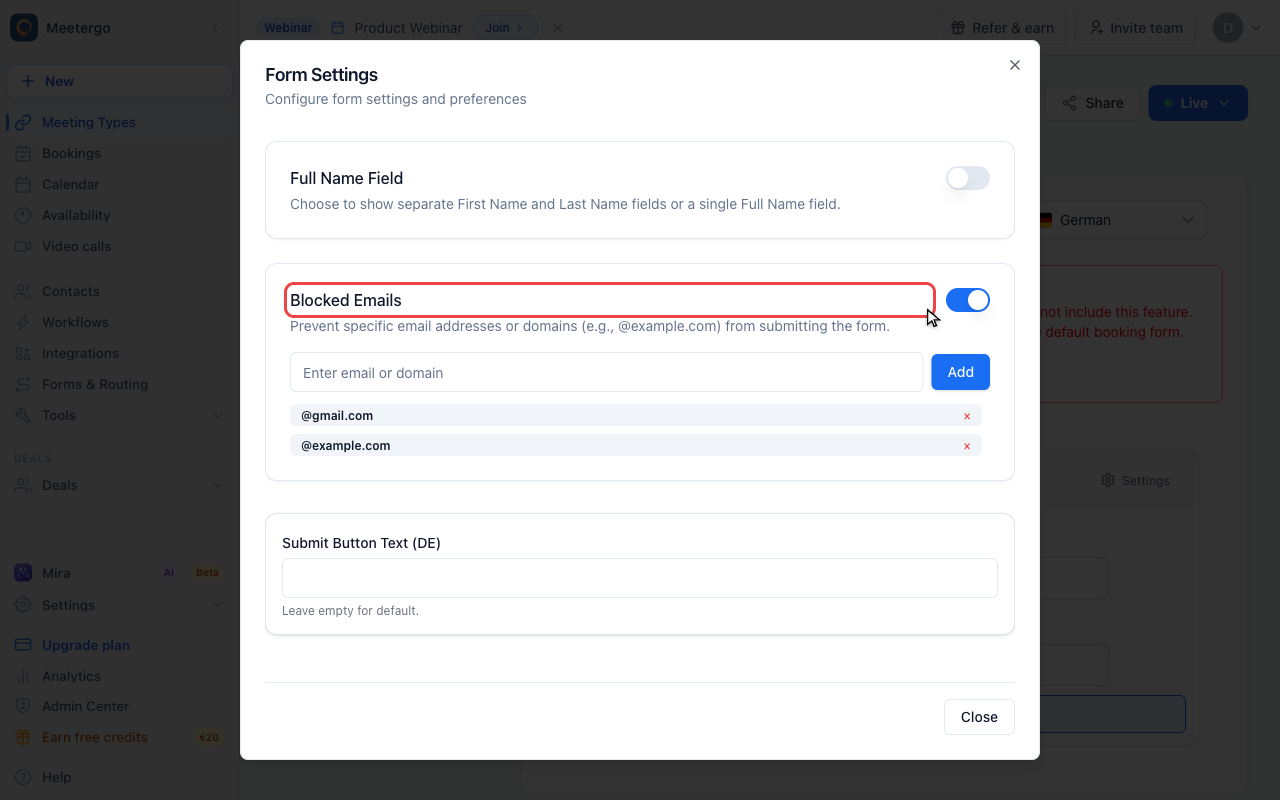
Review blocked domains
Add full email addresses or domains such as @gmail.com. Removing a badge allows that address or domain again.
What Are Email Domain Restrictions?
This feature allows you to:
- Block specific domains: Prevent bookings from certain email providers
- Require business emails: Only accept work email addresses
- Filter out spam: Reduce unwanted bookings from free email accounts
When enabled, attendees using blocked email domains see an error and cannot complete their booking.
How It Works
- You define a list of blocked email domains
- Enable the email blocking feature on your form
- When someone tries to book with a blocked domain, they're prevented from completing the booking
- They must use an allowed email address instead
Default Blocked Domains
By default, meetergo blocks common personal email providers:
@gmail.com@outlook.com@yahoo.com@hotmail.com@aol.com
You can customize this list to add or remove domains.
Configure Email Restrictions
On Forms/Meeting Types
- Go to your Form settings or Meeting Type → Booking Form
- Find Email Restrictions or Block Emails
- Enable Block Emails
- Edit the Blocked Domains list
- Save changes
Adding Domains to Block
To add a domain to the blocklist:
- Open the blocked domains list
- Add the domain (e.g.,
@example.com) - Include the
@symbol for clarity - Save changes
Removing Domains from Blocklist
To allow a previously blocked domain:
- Open the blocked domains list
- Find and remove the domain
- Save changes
Use Cases
B2B Sales
Ensure only business contacts book:
Block: Personal email providers Allow: Company email domains
This helps qualify leads and ensures you're meeting with decision-makers at real companies.
Enterprise Requirements
When your sales process requires business validation:
Block: All free email providers Allow: Only corporate domains
Useful when you need to verify company affiliation before meetings.
Spam Reduction
Reduce unwanted bookings:
Block: Known spam domains, disposable email services Allow: Legitimate email providers
Regional Targeting
If you only serve certain markets:
Block: Email providers from non-target regions Allow: Regional business email providers
Customizing the Blocklist
Common Additions
Consider blocking:
| Domain | Reason |
|---|---|
@protonmail.com | Anonymous email |
@mail.com | Free email |
@ymail.com | Yahoo variant |
@icloud.com | Personal Apple email |
@live.com | Microsoft personal |
@mailinator.com | Disposable email |
Removing Defaults
You might remove defaults if:
- You serve small businesses who use Gmail
- Your target market commonly uses personal email
- You want maximum booking accessibility
What Attendees See
When Blocked
If someone enters a blocked email:
- They see an error message
- Cannot proceed with booking
- Must change to an allowed email
Best Practice: Clear Messaging
Consider noting email requirements:
- "Please use your work email address"
- "Business email required for booking"
- Mention why business email is needed
Interaction with Other Features
With CRM Integration
Email restrictions help CRM data quality:
- Business emails match company records
- Easier to enrich contact data
- Better for lead scoring
With Routing Forms
For qualification flows:
- Block personal emails early in the funnel
- Route based on email domain (company size, etc.)
With Multiple Forms
Each form can have different restrictions:
- Public contact form: No restrictions
- Sales demo booking: Business email required
- Enterprise consultation: Specific domains only
Best Practices
Balance Accessibility and Quality
Too strict:
- Lose legitimate leads
- Frustrate potential customers
- Miss small business opportunities
Too loose:
- Spam bookings increase
- Lead quality decreases
- Wasted meeting time
Consider Your Audience
| Audience | Recommendation |
|---|---|
| Enterprise B2B | Block personal emails |
| SMB Sales | Consider allowing Gmail |
| Consumer Services | No restrictions |
| Freelancers | Allow all emails |
Communicate Requirements
If blocking personal emails:
- Mention it in marketing materials
- Add note on booking page
- Explain why (security, lead qualification)
Test Your Settings
- Enable restrictions on a test form
- Try booking with blocked domains
- Verify error message is clear
- Test with allowed domains
Troubleshooting
Legitimate Users Can't Book
If valid prospects are blocked:
- Check if their domain is in blocklist
- Verify the domain spelling
- Add their domain to allowed list (by removing from blocklist)
Blocking Not Working
If blocked emails still go through:
- Verify "Block Emails" is enabled
- Check the domain is correctly formatted
- Ensure form settings are saved
- Test with a blocked domain
Partial Domain Matching
Domains are matched exactly:
@gmail.comblocksuser@gmail.com- Does NOT block
user@gmail.co.uk(different domain)
Add variants separately if needed.
FAQ
Can I require specific domains instead of blocking?
Currently, the feature works as a blocklist. To require specific domains, block all common providers except those you want.
Does this apply to all meeting types?
Each form/meeting type has its own blocklist settings. Configure each one as needed.
What message do blocked users see?
A standard error message appears. Users must use a different email address to proceed.
Can I block specific email addresses, not just domains?
The current feature works at the domain level. For specific address blocking, contact support.
Do blocked emails get logged anywhere?
Blocked booking attempts may appear in logs but don't create bookings.
Can attendees bypass by using a different email later?
They can book with an allowed email. If they provide a blocked email elsewhere (like in form fields), that's not blocked.
Related Articles
Was this article helpful?
Let us know if this article answered your questions.