
Language settings: change the language and translate forms and emails
Language settings for booking pages, forms and emails: multi language support, how to add a language, show your booking page in English, translate a form into English, and which texts stay in your default language. Portuguese is not supported.
Want your attendees to receive confirmation emails, reminders, and calendar invitations in their own language? Simply enable additional languages in your organization settings — meetergo will then automatically match the attendee's language.
If only one language is enabled, everything — booking page, emails, calendar invitations — will always be in that language. To support multiple languages, you need to add them in your settings first. Language pickers only appear once a second language is active, which is why the option seems to be missing.
 1 / 5
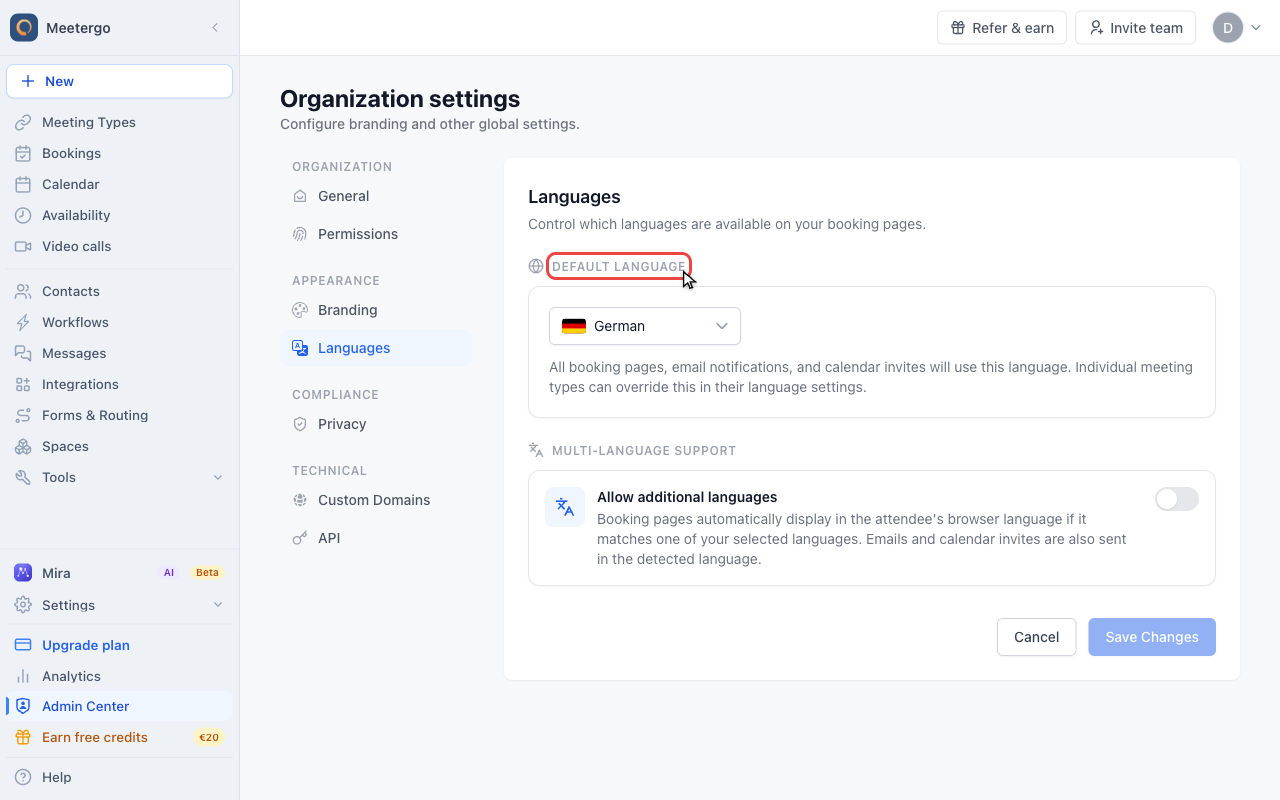
1 / 5Default Language is used when meetergo cannot match the attendee to another allowed language.
Set organization languages
Choose the default language
Default Language is used when meetergo cannot match the attendee to another allowed language.
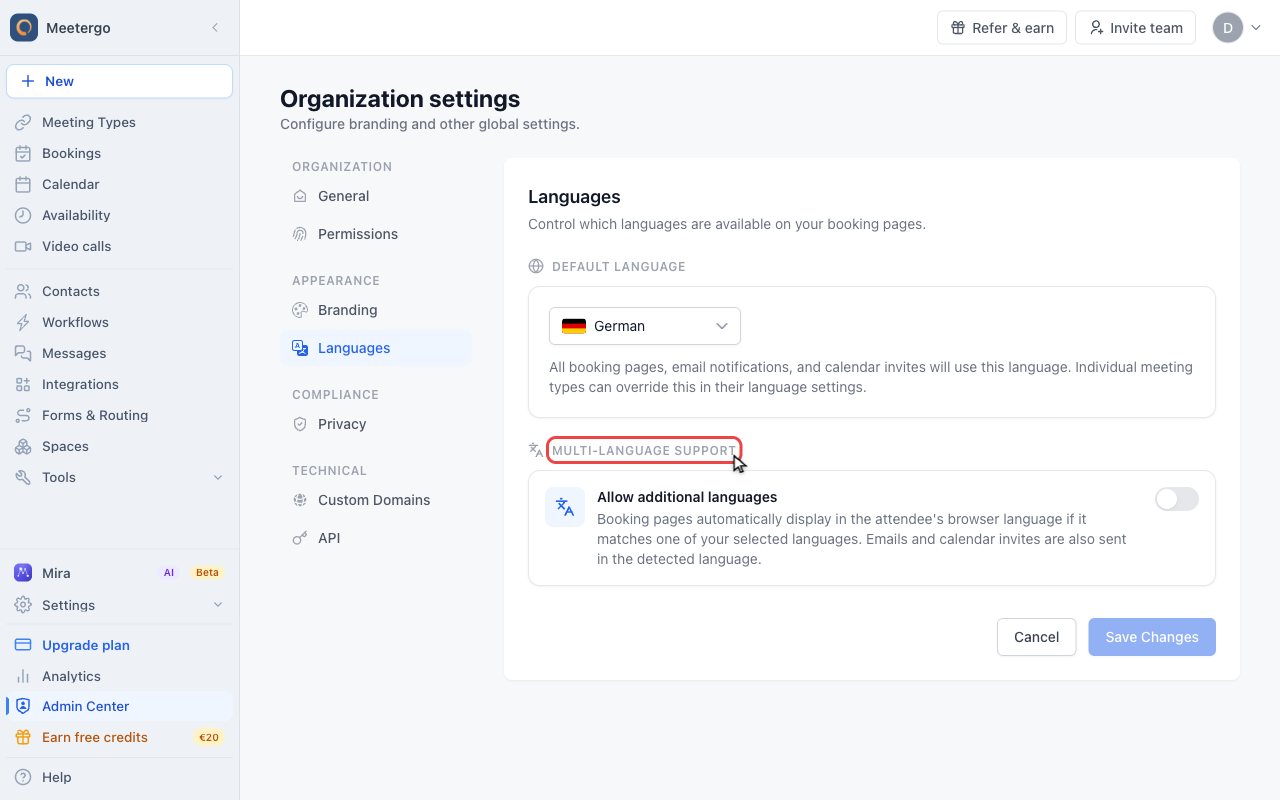
Review available languages
Multi-Language Support controls which languages attendees can receive booking pages and notifications in.
Override one meeting type
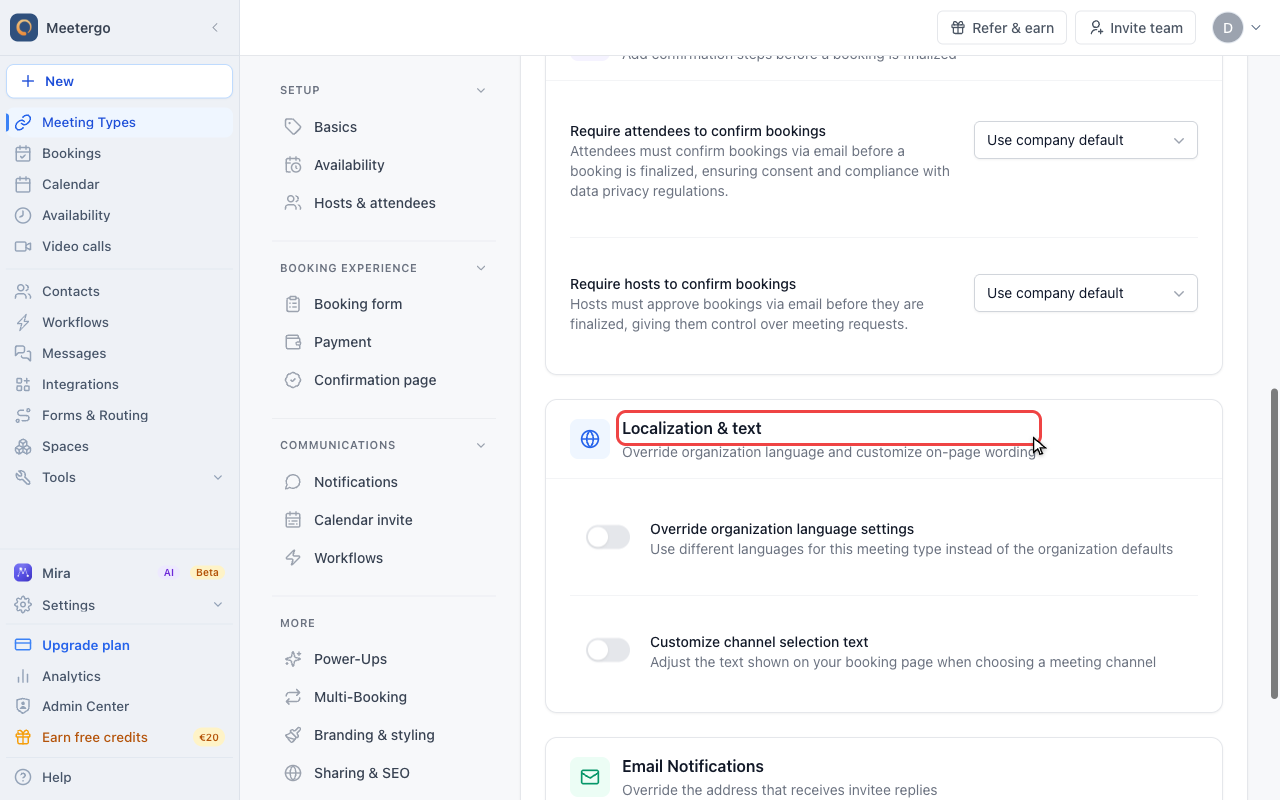
Find Localization & text
This card groups language overrides and custom booking-page wording for the selected meeting type.
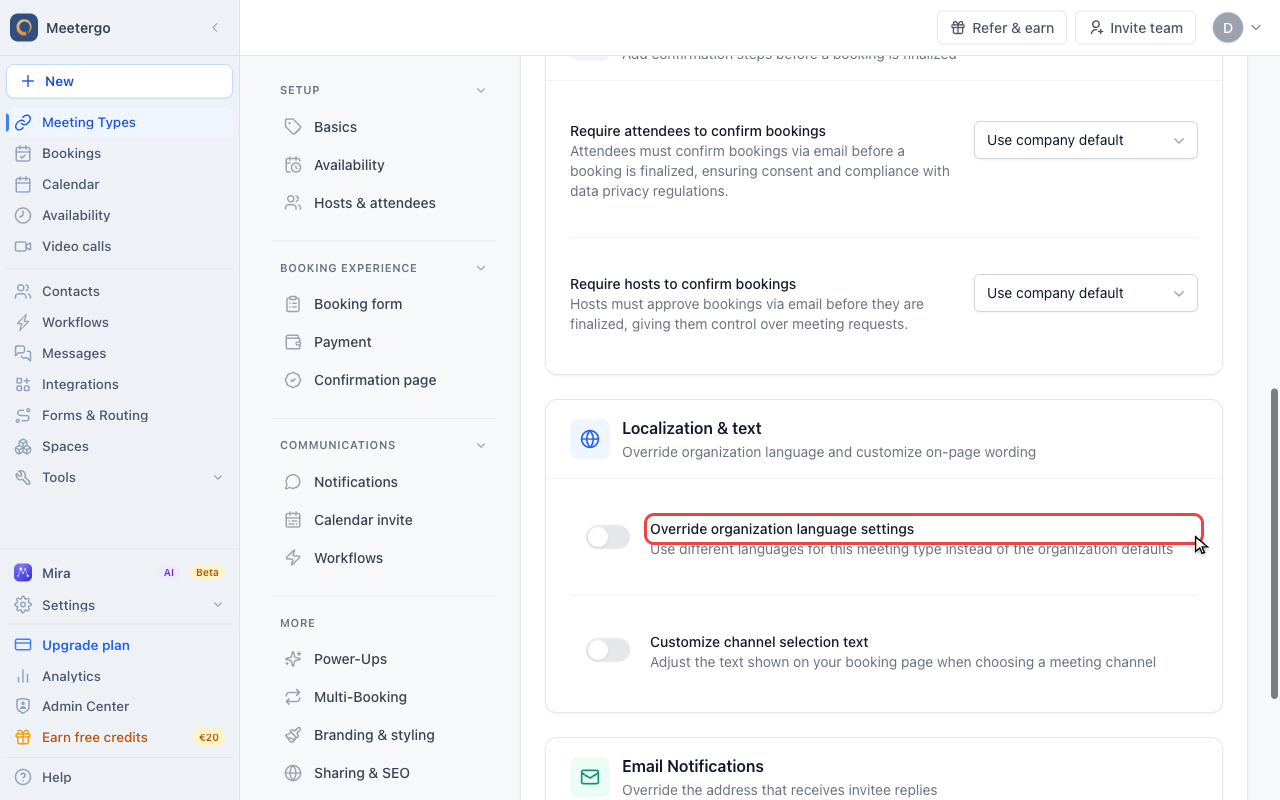
Use Override organization language settings
Turn this on only when this meeting type needs a different language set than the organization default.
Review active languages
Review notification language coverage
Use this view to confirm whether attendees can receive confirmations, reminders, and cancellation emails in the expected languages.
Where languages are set
There are two places, and they stack:
| Scope | Where | Who can change it | Plan |
|---|---|---|---|
| Whole account | Settings → Company → Languages (Open settings) | Company admins only | One language: every plan. Allow additional languages: Suite (formerly Growth) |
| One meeting type | Meeting type → More → Advanced → Localization & text → Override organization language settings | Anyone who can edit that meeting page | Light (formerly Essentials) |
The account-wide screen has two parts: Default Language (the fallback, and the language new meeting types are written in) and Multi-Language Support with the Allow additional languages toggle and the Available Languages list.
The meeting type override replaces the organization set for that one booking page. If you select exactly one language there, that booking page is always in that language, no matter what the attendee's browser says.
Company languages are under Settings → Company → Languages and require admin access. The Advanced tab for a single meeting type sits in the collapsed More group of its editor.
Available languages
English (en), German (de), French (fr), Spanish (es), Italian (it), Dutch (nl), Polish (pl), Norwegian (no), Danish (da), Turkish (tr).
Portuguese is not available, neither European nor Brazilian, and neither is Swedish. Attendees in Brazil or Portugal see the booking page in your default language. If you need a language that is not on the list, write to support@meetergo.com so we can record the request.
How meetergo picks the language
| Situation | Language used |
|---|---|
| One language active | Always that language. The attendee's browser is ignored. |
| Several languages active | The attendee's browser language, if it is one of yours. Otherwise the default language. |
Link ends in ?lang=it | The booking page is always shown in that language. |
The ?lang= parameter behaves differently for notifications: emails and calendar invitations only use it if that language is in your active set. ?lang=fr on a German-only meeting type shows a French booking page but still sends German emails.
There is no language switcher on the booking page. Attendees never choose a language by hand, so a language-specific link (?lang=it) is the way to steer one campaign or audience.
Where the language applies
| Element | Language used |
|---|---|
| Booking page | Browser language or ?lang= parameter |
| Confirmation email | Attendee's language (if in the active set) |
| Reminder and follow-up emails | Attendee's language (if in the active set) |
| Calendar invitation | Attendee's language (if in the active set) |
| Reschedule and cancellation pages | The language the attendee booked in |
| Business card | Organization languages only — a meeting type override does not reach it |
| Your dashboard | English or German only, see below |
What is translated for you and what you translate yourself
meetergo ships translations for everything it writes itself. Everything you type exists only in the language you typed it in.
| Text | Translated automatically | Where you add other languages |
|---|---|---|
| Buttons, labels, dates, error messages | Yes | — |
| "I have read the privacy policy" consent line | Yes | — |
| Confirmation and cancellation pages | Yes | — |
| Meeting type name and description | No | Meeting type → Setup, language picker at the top of the page |
| Booking form questions, help text, submit button text | No | Meeting type → Booking form → language picker |
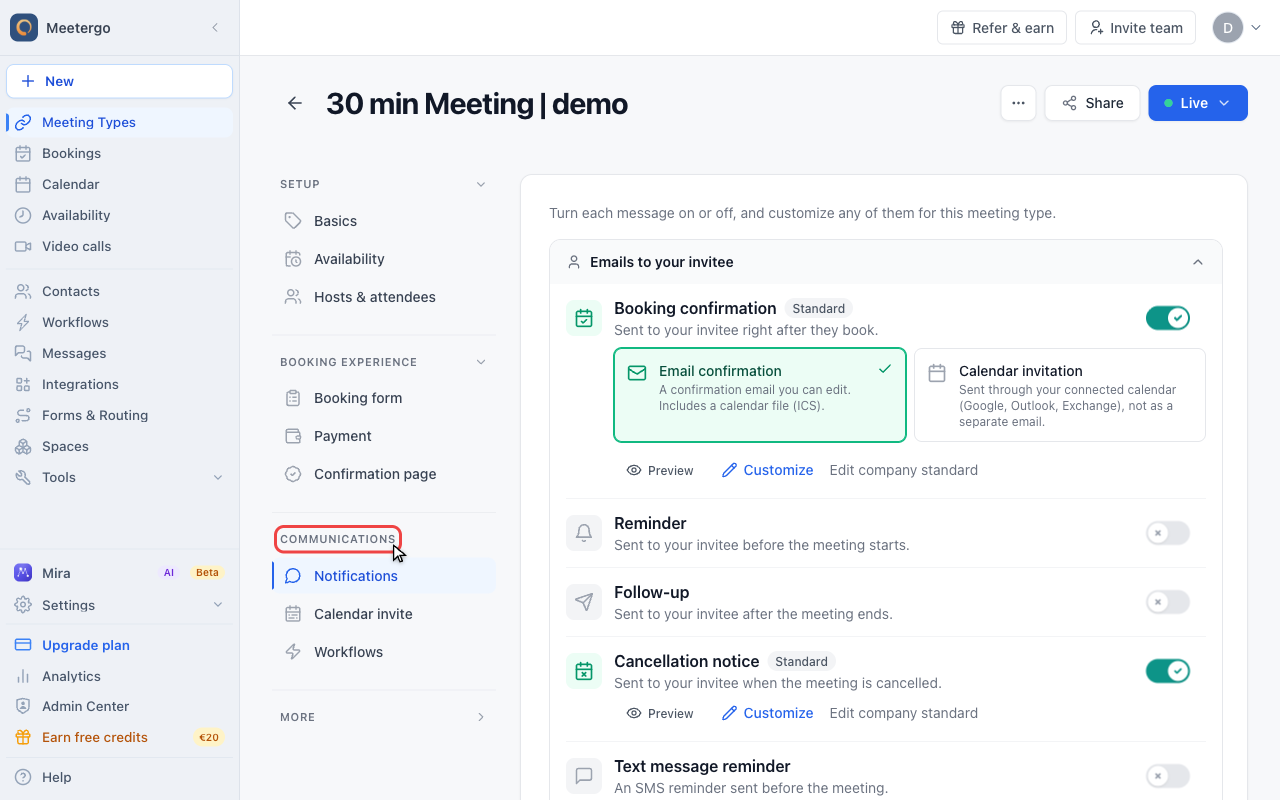
| Email templates (confirmation, reminder, cancellation) | No | Meeting type → Communications → Notifications, language picker plus the Ask Mira button |
| Calendar invite title, location, description | No | Meeting type → Calendar invite, language picker plus Ask Mira |
| Routing form and booking form questions in the form builder | No | Form → language picker in the toolbar |
| Custom legal note above the booking button | No | Not possible — it is stored once, see below |
Leaving a translation empty is safe: the booking page falls back to the default-language text for that field. That fallback is also why a page can look half-German and half-English — the interface follows the attendee, your own wording does not.
The Ask Mira button next to the language picker in the email and calendar invite editors has a Translate tab: pick the target languages and it translates the current text into all of them in one step. You review the result before it is applied.
Translate a form into English
The language picker in the form builder only lists the languages that are active for your account, so with a single language there is nothing to pick and the option looks missing.
Add English to the account
Go to Settings → Company → Languages, turn on Allow additional languages and tick English. The Add language entry at the bottom of every language picker jumps straight to this screen.
Switch the builder to English
Open the form and use the language picker in the toolbar. Every question label, help text and button text you now edit is stored for English only.
Check the fallback
Any field you leave blank in English falls back to your default-language text on the live form, so translate every field you do not want to appear in German.
The privacy note stays in your default language
The standard consent line ("I have read the privacy policy") is translated into all ten languages automatically. The custom legal note above the booking button (Settings → Legal & privacy) is different: it is one free text for the whole account, with no per-language version. Setting a meeting type to Italian does not translate it.
If you need that text in the attendee's language, put it into the booking form instead: meeting type → Booking form → Add questions to form, add a text block and write it per language. Links inside field labels use Markdown.
See How to Customize the Privacy Text on Booking Forms.
The dashboard is English or German only
The language of your own meetergo dashboard is separate from your booking-page languages. Switch it in the profile menu at the bottom of the sidebar; the only options are English and German. The ten booking-page languages apply to what your attendees see, not to the admin interface.
FAQ
Do you support Portuguese or Brazilian Portuguese?
No. The supported list is English, German, French, Spanish, Italian, Dutch, Polish, Norwegian, Danish and Turkish. Write to support@meetergo.com if you need another language so we can record the request.
Why is my booking page a mix of German and English?
Standard elements follow the attendee's language while your own texts (meeting type name, description, form questions) only exist in the language you wrote them in. Either add the missing translations in the language picker of each editor, or turn multi-language off so everything stays in one language.
I cannot find any language option anywhere. Where is it?
Language pickers only appear once more than one language is active, and the account-wide screen is in the Settings → Company → Languages (company admins only, Suite for more than one language). The per-meeting-type override lives under More → Advanced, inside the collapsed More group.
Will changing language settings affect existing bookings?
No, only new bookings are affected.
Why are my attendees receiving emails in the wrong language?
Most likely only one language is enabled, so every email goes out in that language. Add the languages you want in Settings → Company → Languages. If the language is active but the email still reads wrong, check that an email template exists for it — a missing template falls back to the default language.
Can I set different languages for different meeting types?
Yes — turn on Override organization language settings in the meeting type's More → Advanced → Localization & text card.
Related Articles
- Booking questions and the booking button text - Where the per-language form fields and the submit button text live
- How to Customize the Privacy Text on Booking Forms - The custom legal note and why it has no translations
- Customize Booking, Cancellation & Notification Emails - Per-language templates and the Ask Mira translation dialog
- Change the calendar event title, location, and description - Per-language calendar invite content
Was this article helpful?
Let us know if this article answered your questions.